Please follow the steps below to setup and install the channels.
How to install the channels when I use my Philips TV for the first time?
Published on 24 June 2026
Select your menu language (steps 1-3)
- Press [Menu].
- Press [Up][Down][Left][Right] to select [Setup] > [Installation] > [Language] > [Menu language].
- Press [OK] or to enter [Menu language].
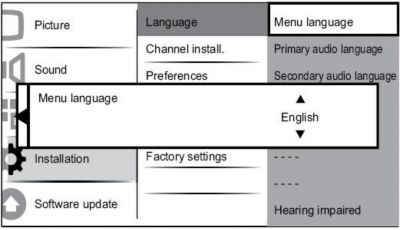
Steps 4-6
- Press [Up][Down] to select a language setting.
- Press [OK] to confirm.
- Press [Left] to return to [Installation] menu.
Select your country (steps 1-2)
- Press [Menu].
- Press [Up][Down][Left][Right] to select [Setup] > [Installation] > [Channel install.] > [Channel assistant].

Step 3
- Press [OK] or [Right] to enter the menu, then the country menu appears.
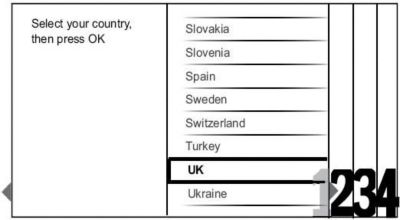
Step 4-5
- Press [Up][Down] to select your country.
- Press [OK] to confirm your choice. then the channel installation guide appears on the screen.
