It is possible to choose a number of rings before an incoming call is sent to your Philips phone's answering machine. See below how to setup this feature:
How to choose when a call is sent to the Philips phone's answering machine?
Published on 24 June 2026
Step by Step guide
Make sure the answering machine is switched on
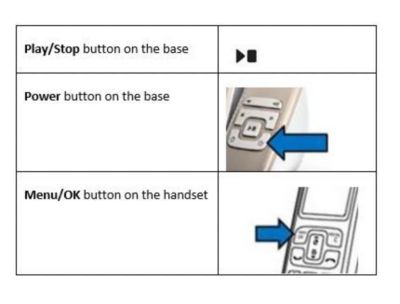
When it is on, the Play/Stop button on the base station lights up
To switch on the answering machine, press the Power button located on the base station
On the handset, press MENU/OK button
Select Answ. Machine > Ring delay
Press the MENU/OK button to confirm
Select a new setting, then press the MENU/OK button to confirm
Notes
- If you want to change the settings of the voicemail, which is a service provided by the telecommunication service provider, contact the service provider for the instructions
- Take into consideration that if you select to have many rings, the caller may hang up before the call is picked up by the answering machine; or, if you have voicemail service subscribed, the call is picked up by the voicemail of the telecommunication service provider instead