Please watch the movie or follow the written instruction below with the easy steps how to descale your SENSEO Twist.
How do I descale my SENSEO Twist?
Published on 24 June 2026
Play Pause
Important:
1) The descaling procedure consists of 3 cycles:
- 1 descaling cycle
- 2 flushing cycles
2) Never interrupt the cycles of the descaling process. If you do, the CALC light will not go out.
3) Make sure that you start the descaling cycle by pressing the 1-cup button and the 2-cup button at the same time.
4) Remove the BRITA MAXTRA filter before adding the descaling mixture into the water tank. (specific HD7873 only)
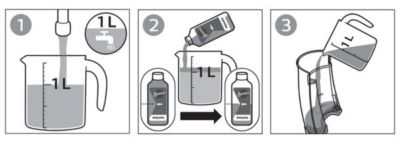
Descaling instruction step 1 - 3
1) Mix half a bottle of the SENSEO liquid Descaler with 1 liter of water in a measuring jug
2) Remove the water tank, fill it with the descaling mixture and put it back onto the coffee machine.
Note: Remove the BRITA MAXTRA filter before you pour the descaling mixture into the water tank. (specific HD7873 only)
3) Press the ON/OFF button to switch on the machine.
Descaling instruction step 4 - 7
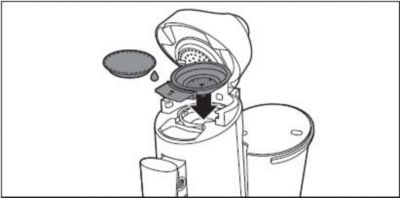
4) Place the 1-cup pod holder with a used coffee pod. Close the lid and make sure it is properly locked.
Note: The used coffee pod serves as a ‘filter’ to prevent the sieve in the pod holder from getting clogged with scale residues.
5) Remove the drip tray and put a bowl with a capacity of at least 1.5 liters under the spout to collect the descaling mixture.
6) When the ON/OFF button lights up continuously you can start the descaling cycle.
7) Start the descaling cycle by pressing the 1-cup button and the 2-cup button at the same time for 3 seconds until you hear a beep.
The CALC light and the ON/OFF button start flashing to indicate that the descaling cycle is in progress.
During the descaling cycle, the water comes out of the machine in intervals.
Note: Never interrupt the descaling cycle.
Descaling instruction step 8 - 9
8) When all the water in the water tank has been used up, the descaling cycle is finished.
The ON/OFF button starts flashing rapidly to indicate that the water tank is empty.
The CALC light continues to flash slowly to indicate that the descaling procedure is still active.
9) Empty the bowl and place it back under the spout and continue with the flushing cycle.
Note: Do not switch off the machine between the descaling and the flushing cycle.
Flushing cycle 1 instruction step 10 - 13
10) Rinse the water tank with fresh water to make sure no descaling agent is left behind.
11) Fill the water tank up to the top with fresh tap water and place it back.
12) When the ON/OFF button lights up continuously you can start the flushing cycle.
13) Start the flushing cycle by pressing the 1-cup button and the 2-cup button at the same time for 3 seconds until you hear a beep.
The CALC light and the ON/OFF button start flashing slowly to indicate that the flushing cycle has started.
When all the water in the water tank has been used up, the first rinsing cycle is finished.
The ON/OFF button starts flashing rapidly to indicate that the water tank is empty. The CALC light continues to flash slowly to indicate that the descaling procedure is still active.
Flushing cycle 2 instruction step 14 -
14) Repeat step 10 to 13 once more to finish the second flushing cycle.
When all the water in the water tank has been used up the appliance switches off automatically.
The descaling procedure is finished.
